
Starbucks Partner Hours App: Access Work Schedules Easily
Need to check your Starbucks schedule or swap a shift? The Starbucks Partner Hours app lets you do it all view hours, request time off, and stay updated, right from your phone. Whether you use WorkJam, the SBUX Partner Hours app, or scan the Starbucks partner hours app QR code, this guide shows you exactly how to get started.
Many partners get confused with names like the Starbucks work app or partner hours Starbucks app, but don’t worry we’ll break it down step by step. You’ll learn how to install the Starbucks partner app, avoid common issues, and use it like a pro.
How to Download the Starbucks Partner Hours App
There are two official ways partners can access their schedules:
- Via the Starbucks Partner Hours App (through Intelligent Hub + QR code)
- Through the WorkJam app

Option 1: Downloading via Intelligent Hub & QR Code
This is the most common and secure way to set up your account.
- Download VMware Intelligent Hub from the App Store (iOS) or Google Play (Android).
- Open the app, enter the Starbucks Group ID: starbucks, and follow the prompts.
- Scan the Starbucks QR code (from your manager or Partner Hub).
- Install the recommended apps, including SBUX Partner Hours.
- Open the Partner Hours app and log in with your Global Username and password.
Once you’re signed in, you can delete any extra apps you don’t need.
Through the WorkJam app
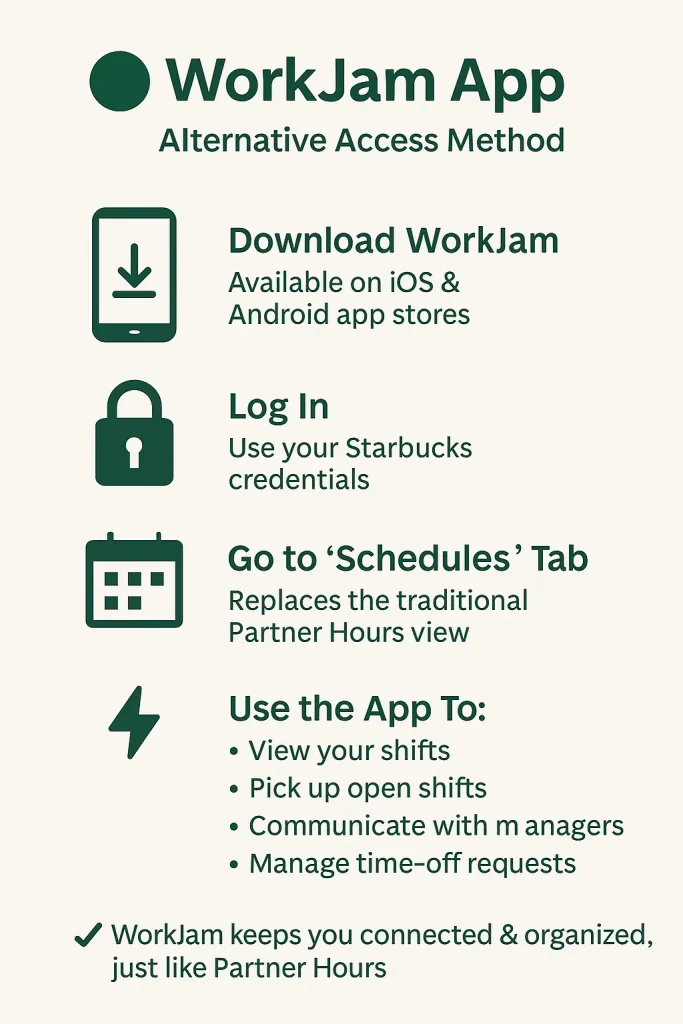
In some regions, Starbucks uses WorkJam instead of Partner Hours.
- Download the WorkJam app from your app store.
- Log in with your Starbucks credentials.
- Go to the Schedules tab to view your shifts.
- Use the app to pick up shifts, request time off, and message your manager.
How to Use the Starbucks Partner Hours App
Once installed, the Starbucks Partner Hours app becomes your one-stop tool for managing everything work-related. Here’s how partners actually use it:
1. View Your Work Schedule
- Open the app and log in with your Starbucks Global Username and password
- Go to the “Schedule” or “My Shifts” tab
- You’ll see your daily, weekly, and upcoming shifts
- Tap a shift to see start time, end time, and store location
2. Swap or Pick Up Shifts
- Tap on the shift you want to offer up for trade
- Choose “Swap” and select eligible coworkers
- You’ll get a notification once a partner accepts and your manager approves it
- You can also pick up available open shifts from others in the “Open Shifts” tab
3.Request Time Off
- Go to the Time Off section
- Select the day(s) you want off and submit the request
- Some stores auto-approve, while others require manager review
- Track the status under “My Requests”
View Pay & Benefits
- See pay periods and past stubs
- Track hours worked
- Check benefit eligibility and enrollment
5. Stay in the Loop
Enable push notifications to get:
- Shift reminders
- Announcements from managers
- Schedule changes
Key Features of the Starbucks Partner Hours App
The Starbucks Partner Hours app is more than just a schedule viewer. Whether you’re using the SBUX Partner Hours app, the Starbucks work app, or accessing it through WorkJam, here’s what it actually offers:
1. Schedule Management
- See your full work schedule (daily, weekly, monthly)
- Tap on shifts to view start/end times and store location
- Automatic updates if schedules change
Used daily by partners to track upcoming shifts
2. Shift Swapping & Picking Up Shifts
- Offer your shift to coworkers
- Pick up open shifts based on your availability
- Built-in manager approval flow for easy processing
Tip: This is one of the most used features, especially in the WorkJam version.
3. Time-Off Requests
- Submit paid or unpaid time-off requests
- Track approval status directly in the app
- Some stores auto-approve certain requests based on policy
Feedback: Reddit users say this saves time versus asking in person.
4. Pay Stub & Hours Tracking
- View past pay periods and hours worked
- Confirm your total hours before payroll closes
- Helps track overtime and benefits eligibility
This feature alone makes the partner hours Starbucks app worth using weekly.
5. Notifications & Announcements
- Get real-time push notifications for shift changes
- Receive store-wide announcements from your manager
- Stay in the loop without checking bulletin boards
Tip: Enable all notifications to avoid last-minute surprises.
6. Training & Resources (WorkJam only)
- Access training modules, quizzes, and store policies
- Complete onboarding tasks and e-learning content
- See performance goals or upcoming store events
Available mostly through the Starbucks work app (WorkJam) version.
7. Secure, Centralized Access
- Uses Starbucks Global Username for login
- Setup through QR code + Intelligent Hub for added security
- Can be locked down remotely if device is lost
Real User Experiences
The Starbucks Partner Hours app does what it’s built for but depending on the version (WorkJam or the classic SBUX app), partner feedback is mixed. Here’s what real users are saying:
What Partners Like
“It’s super easy once you get past the setup.”
— Reddit user “One-hangs-lower” (April 2025)
- Partners appreciate that once installed, the app is fast and reliable for checking shifts.
- Features like shift swapping and open shift pickup are big wins—especially in the WorkJam version.
- Many say it’s better than using the old printed schedules or waiting on managers.
What Partners Struggle With
“Still works in 2025, but the download process is wild.”
— Reddit user “PuhUhLohMa”
“Why do I need four different apps just to see my hours?”
— Reddit, r/starbucks
- Many partners are confused about:
- Why multiple apps are needed (Intelligent Hub, VPN, etc.)
- Which app to use (WorkJam vs. Starbucks Partner app)
- The need for a QR code just to install
- Why multiple apps are needed (Intelligent Hub, VPN, etc.)
- Some say the app crashes or logs them out often if it isn’t updated.
- There’s confusion over whether the partner hours Starbucks app is being “sunset” or replaced (as noted in Reddit posts from early 2025).
Workarounds Partners Use
“I just use the Partner Links website. Way easier.”
— Reddit user “Key_Elderberry_6395”
- Many partners skip the app entirely and check their schedule using the Partner Hub or web portal.
Some recommend keeping both WorkJam and the older Starbucks partner app installed to avoid login issues.
FAQs
Wrapping Up
The Starbucks Partner Hours app helps partners stay organized, in control, and connected whether you’re using the WorkJam platform, the SBUX Partner Hours app, or scanning a Starbucks partner hours app QR code. While setup can feel a bit clunky, once installed, the app is a powerful tool for managing shifts, requesting time off, and keeping your Starbucks work life on track.