How to Access Starbucks Paystub | Partner Hub Guide
Need to see your Starbucks paystub fast? Whether you’re tracking hours, preparing taxes, or applying for a loan, having quick access to your earnings is essential. Starbucks offers several ways to get your pay details online, in the app, or directly from your store.
In this guide, you’ll learn every method to view and download your Starbucks paystub, plus what to do if you can’t log in. We’ll cover Partner Hub, the mobile app, direct deposit emails, and manager requests so you’re never stuck waiting for your paycheck info.
How You Can Check Your Starbucks Paystub
Starbucks partners have multiple ways to view their paystubs, so you can choose the option that’s fastest or most convenient for you. The main methods are:
- Partner Hub (Partner Central) Starbucks’ official online portal for pay history.
- Starbucks Partner Mobile App Check and download paystubs directly from your phone.
- Direct Deposit Email If enabled, paystubs are sent to your inbox automatically.
- Manager or HR Request For printed or digital copies when you can’t access online tools.
1. Partner Hub (Partner Central)
The Partner Hub is Starbucks’ main online portal for all work-related info, including paystubs.
Here’s how to access it:
- Go to partner.starbucks.com from any device.
- Log in using your Partner Number and your password.
- On the dashboard, click My Info or Pay History.
- Select the pay period you want.
- Click Download PDF or Print to save a copy.
Tips:
- If you forgot your password, click Forgot Password and follow the prompts.
- Use Google Chrome for fewer compatibility issues.
Enable pop-ups in your browser so the PDF can open.
2. Starbucks Partner Mobile App
The Partner Mobile App lets you check your pay on the go.
Follow these steps:
- Download the “Starbucks Partner” app from the Apple App Store or Google Play Store.
- Log in with the same Partner Number and password you use for Partner Hub.
- Tap Pay in the menu.
- Select the pay date you need.
- Tap Export or Download to save your paystub.
Tips:
- You can share the PDF directly via email if needed for proof of income.
- Keep your app updated for smoother login and better security.
3. Direct Deposit Email
If you’ve set up direct deposit, Starbucks may send a copy of your paystub to your registered email.
- Open your email inbox and search “Starbucks Pay Statement” or the date of your paycheck.
- Check your spam/junk folder if you don’t see it.
- Download the PDF attachment to keep a copy.
Tip: If you’re not receiving these emails, confirm your email address with HR or update it in Partner Hub.
4. Manager or HR Request
If you can’t log in online, or you’re a former partner without access, you can request your paystub directly.
- Visit your store and ask your manager for a copy.
- If you’re no longer employed, contact Starbucks HR or the Partner Contact Center at 888-SBUX-411.
- Provide your name, Partner Number, and the pay period needed.
- They will either email or print the paystub for you.
Tip: Bring a valid ID when making in-person requests.
What’s Included in a Starbucks Paystub
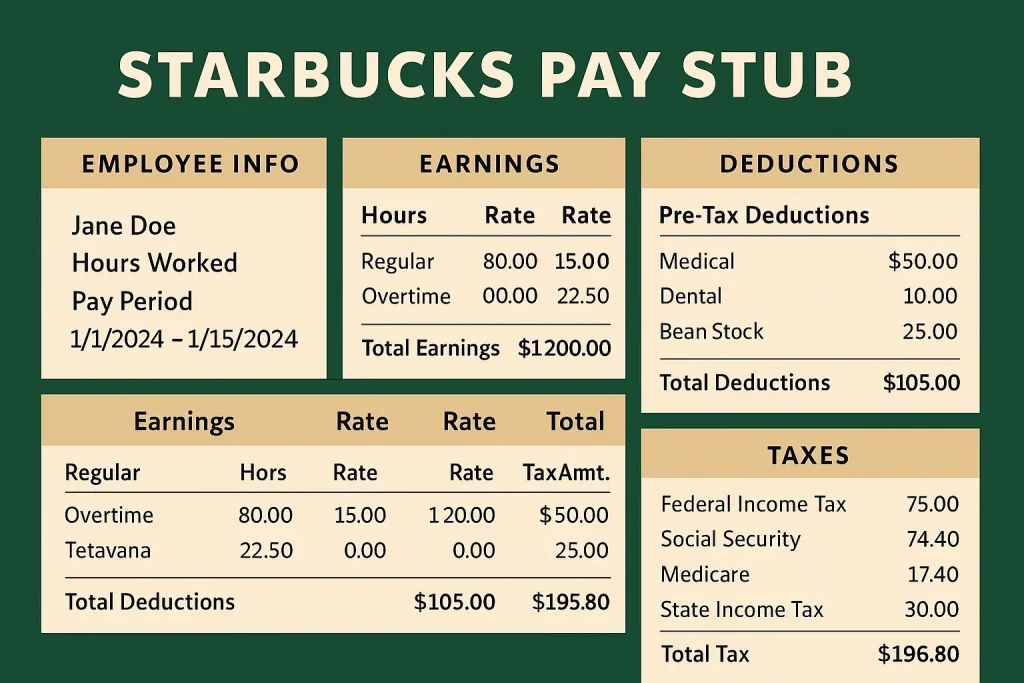
Your Starbucks paystub is more than just your paycheck amount—it’s a detailed record of your work and earnings for that pay period. Here’s what you’ll typically find on it:
- Personal Details – Your name, Partner Number, and sometimes your store location.
- Pay Period & Pay Date – The range of dates worked and the date you were paid.
- Hours Worked – Regular hours, overtime hours, and any holiday hours.
- Earnings – Your hourly rate, total gross pay, and breakdown of any bonuses or tips.
- Deductions – Taxes, Social Security, Medicare, and any benefit contributions (like health insurance or 401k).
- Net Pay – The final amount deposited into your account after deductions.
- Year-to-Date (YTD) Totals – Cumulative earnings and deductions for the year so far.
Tip: Always review your paystub carefully to make sure your hours, rate, and deductions are correct. If you see an error, contact your manager or HR immediately.
Troubleshooting Access Issues
If you’re having trouble viewing or downloading your Starbucks paystub, try these fixes:
- Reset Your Password – On the Partner Hub or mobile app login page, click Forgot Password and follow the prompts.
- Clear Browser Cache – Old cookies or cache can block logins; clear them in your browser settings.
- Enable Pop-Ups – Paystubs often open in a pop-up window, so make sure they’re allowed in your browser.
- Try a Different Device – If you can’t access it on your phone, try a laptop or vice versa.
- Check internet Connection – Slow or unstable internet can prevent downloads.
- Contact Partner Contact Center – Call 888-SBUX-411 for direct help with login or paystub retrieval.
- HR Request for Former Partners – If your portal access has expired, HR can send archived copies via email or mail.
Tip: Keep your contact info updated in Partner Hub so you never miss paystub emails or login alerts.
Starbucks Paystub FAQs
Q1: How often do Starbucks paystubs come out?
Starbucks partners are usually paid biweekly, so a new paystub is available every two weeks in Partner Hub and the mobile app.
Q2: Can I see old Starbucks paystubs?
Yes. Partner Hub stores past paystubs by pay period. Simply choose the date you need and download the PDF.
Q3: What if I’m a former Starbucks partner?
Once you leave Starbucks, your online access may expire. Contact the Partner Contact Center (888-SBUX-411) or HR to request copies.
Q4: Can I print my paystub from the mobile app?
Yes. Download the paystub as a PDF, then print it from your phone or forward it to your email for printing.
Q5: Do Starbucks paystubs include tips?
If tips are processed through payroll, they’ll be listed under the earnings section on your paystub.
Q6: Who do I contact for errors on my paystub?
Reach out to your store manager or Starbucks HR immediately to correct any mistakes in hours, rate, or deductions.
Conclusion
Checking your Starbucks paystub is simple once you know the options—Partner Hub, the mobile app, direct deposit emails, or requesting it from HR or your manager. Each method gives you quick access to important details like hours worked, deductions, and net pay, so you can stay on top of your earnings.
Make it a habit to review your paystub every payday to ensure accuracy and keep organized records for taxes or financial planning. And if you ever run into login issues or need past paystubs, Starbucks’ support channels are always there to help you get back on track.