Starbucks Partner Availability: How to Get the Shifts You Want
Want more hours at Starbucks? Need your schedule to actually match your real-life availability? This guide breaks down how Starbucks partner availability works—and how to set it so you get the shifts you want.
Whether you’re a new barista trying to balance school or a seasoned partner pushing for full-time hours, knowing how to manage your partner availability inside the Starbucks schedule system is key. We’ll show you how to update it, how your availability affects your assigned partner hours, and how to avoid getting stuck with shifts you didn’t ask for.
How to Set or Update Your Starbucks Partner Availability
Setting your Starbucks partner availability is how you tell your store when you’re able—and willing—to work. It directly affects how many hours you get scheduled each week.
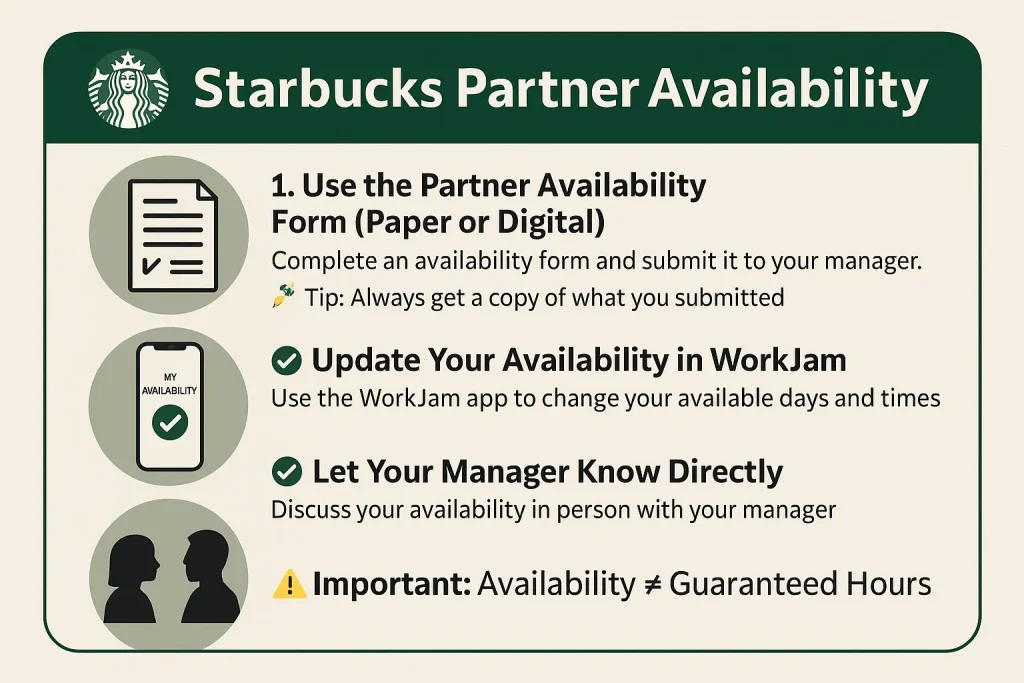
1. Use the Partner Availability Form (Paper or Digital)
Most stores will ask you to fill out an availability form when you’re hired or anytime your schedule changes. It’s usually:
- A paper form you submit to your manager
- Or a digital form submitted via WorkJam or Partner Hub
- Tip: Always get a copy of what you submitted so you have a record.
2. Update Your Availability in WorkJam
If your store uses WorkJam (Starbucks’ digital scheduling platform), here’s how to update availability:
- Open the WorkJam app
- Tap “My Availability” under the Scheduling section
- Adjust your available days and times
- Add notes if needed (e.g., “class ends at 3pm, can work after 4pm”)
- Tap Submit changes may require manager approval
“I just updated mine in WorkJam and it took 48 hours to reflect in my schedule.” — Reddit user
3. Let Your Manager Know Directly
Even if you update it in the app, it’s a good idea to talk to your manager in person. Availability impacts labor coverage, so direct communication builds trust and avoids misunderstandings.
Important: Availability ≠ Guaranteed Hours
Setting your availability doesn’t mean you’ll automatically get hours during those times. Starbucks still schedules based on:
- Business needs
- Seniority
- Skill coverage (who can open, close, drive-thru, etc.)
But if your partner availability is up to date and flexible, you’re far more likely to get better partner hours and a schedule that actually works for you.
Availability Requirements & Scheduling Logic at Starbucks
Once you set your partner availability, Starbucks uses it to build the store schedule—but there are rules and expectations most partners don’t realize.
The 150% Availability Rule
Starbucks typically asks partners to provide availability that covers at least 150% of their desired hours. Here’s what that means:
- Want 20 hours/week? You need to be available for at least 30 hours.
- Want full-time (30–40 hours)? You should be available for 45–60 hours.
- “My manager told me they can’t guarantee shifts if my availability is too limited. Gotta show flexibility.” — Reddit user
How the Schedule Is Actually Built
Managers build the Starbucks schedule based on:
- Your availability (as submitted in WorkJam or on paper)
- Store needs (openers, closers, drive-thru trained partners)
- Partner seniority (longer-tenured partners often get more stable hours)
- Labor hours allotted by corporate (your store may be limited on total hours per week)
Just because you’re available doesn’t mean you’ll get those shifts—but partners who give wide, consistent availability tend to get more hours.
What Can Get You Less Hours
- Availability that’s too narrow (e.g., only 3 days/week for 2 hours each)
- Changing availability too often
- Inconsistent schedule performance (lateness, no-shows)
Shift Marketplace: How to Pick Up More Hours at Starbucks
If your Starbucks schedule isn’t giving you enough hours, the Shift Marketplace can help you take control.
What Is the Shift Marketplace?
The Shift Marketplace is a feature in WorkJam (Starbucks’ scheduling app) that lets partners:
- Offer up their scheduled shifts
- Claim open shifts dropped by others
- Pick up extra hours in your store or even in nearby stores (if enabled)
- It’s one of the easiest ways to increase your partner hours especially if your availability is open and your store has fluctuating coverage needs.
How to Use It
- Open the WorkJam app
- Tap on “Marketplace” or “Available Shifts”
- Browse available shifts (day, time, location)
- Tap “Claim” to request the shift
- Wait for approval from a manager (some stores auto-approve)
District-Wide Shift Pickup (New in 2025)
In some regions, Starbucks now allows partners to pick up shifts across stores within a district—not just their home store. This is a huge win if:
- Your store is overstaffed but others need coverage
- You want more flexibility or hours
- Starbucks confirmed in May 2025 that 20,000+ shifts per week are now claimed via the expanded marketplace.
Best Practices
- Check the Shift Marketplace daily—shifts go fast
- Keep your availability updated so the system doesn’t auto-reject your claims
- Communicate with your manager about interest in extra hours
Real Partner Insights & Scheduling Frustrations
While Starbucks encourages a “people-first” scheduling approach, partners across Reddit and Facebook tell a more complicated story. Even when they set their partner availability properly, many still struggle with inconsistent schedules, reduced hours, and unclear expectations.
Common Complaints from Real Partners
“I gave full availability and still only got 15 hours this week.”
— Reddit user, r/starbucks
“I changed my availability three weeks ago and my schedule hasn’t updated yet.”
— Reddit thread on WorkJam issues
“They say it’s based on labor hours, but it feels like seniority always wins.”
— Comment from a 1-year barista
5 Best Practices for Managing Your Starbucks Partner Availability
Getting the shifts you want at Starbucks isn’t just about filling out a form—it’s about staying proactive. Here’s how to actually make your partner availability work in your favor.
1. Update Your Availability Regularly
Don’t assume your original availability still fits. Update it in WorkJam or with your manager if your school, second job, or personal situation changes.
Pro tip: Recheck your settings every 30 days to avoid silent errors.
2. Communicate Directly with Managers
Even if you submit availability through the app, follow up in person. Let your SM or ASM know you’re open to more partner hours, especially during holidays or coverage gaps.
“My hours jumped when I asked to learn drive-thru and helped cover call-outs.”
3. Be Realistic—but Flexible
List availability that truly fits your life, but give Starbucks wide enough options to schedule you. Remember the 150% rule—if you want 25 hours, be available for at least 37–40.
4. Use the Shift Marketplace Strategically
Check the marketplace daily to grab extra shifts or fill your schedule. Some of the best shifts get dropped last-minute, especially on weekends.
5. Watch Patterns in the Schedule
Notice when your store is busiest (e.g., Friday nights, Sunday mornings). Adjust your availability to match those peak times—they’re more likely to be filled.
FAQs
What Are Starbucks Partner Hours?
Managing your Starbucks partner availability is the first step to getting a schedule that works for you—not against you. By updating your availability consistently, staying flexible, and using tools like the Shift Marketplace, you increase your chances of getting the partner hours you want.
Your schedule might not always be perfect—but with the right moves, you’ll have more control, more hours, and way less stress.